Showing posts with label technology. Show all posts

Friday, 13 July 2018

Plans for the weekend in a cold Jozi

Coffee with a view
This is a short update post. Life is changing so fast, and I want to come back here to see how it was ... The Eldest is busy starting to move her things. She is still most of the times at home. The wedding is less than a month away. We are excited!

Last night we were following her on our phones via Live location while she came back from the airport at 11 pm. With an Uber, and we had the Uber guy's name stored as well. That's cool, but also seriously testing our nerves. If the Uber stands still for too long, or the signal picks her up in a random suburb next to the highway.... We begin to worry!!! (I'm sure we will never stop worrying.) Technology makes it easy, but also makes us worry about every little detail. Because, if there really happens something to her, how will we find her when we have to start driving? Screen print the last place on the map? Race to there? Just some of the thoughts that goes through my head at 11 to 11:30pm at night. Luckily she was safe, and her Uber driver delivered her safe and on time.

There's a Kitchen Tea and a Bachelorette's Party coming up this weekend. The Eldest knows about it, but no details. She's got great bridesmaids that sorted everything. Will be reporting back about the Kitchen Tea. We are looking forward to it. I am sure after this the wedding vibes will kick in seriously.

Miss Fine has been on holiday forever. She has been at work with me for three days, and then at Vacation School for two days this week. It has been challenging, but better than when she was younger. I love the fact that she can keep herself busy for longer. She used up my data in record time at the office, but she was reading as well, and enjoyed going to the library here at work. She exchanged a book that she was not feeling for another book the next day. She also helped me with my work, writing on DVD's and pulling up a roster of my daily work which I now have on my door. That was so sweet of her. (No sarcasm here.) Thanks, Miss Fine. I enjoyed our conversations while you kept me company. We don't always get so much time together.

Tonight we will be "chilling" (it's cold here in Johannesburg) at home, and hopefully the weekend will not go by in a blink.

What's your plans for the weekend?

Tuesday, 20 February 2018

Grooming female scientists and engineers of the future

Girls in science classroom
Parktown Girls
Stories about inspiring women and girls are always great to share! We got an email about Parktown Girls who are grooming female scientists and engineers. We have a Miss that only has a few years (3 years eeek!) before she also has to decide what direction she is going to go with regards her career and her subjects. How do we prepare girls like her to choose a career in STEM?

South Africa is in desperate need of qualified scientists and engineers. Compounding this, only 11% of engineers globally are female according to an article published by UNESCO in October 2017.  This is a worldwide phenomenon, despite a rising global demand for qualified science, technology, engineering and, maths (STEM) professionals.
Tracey Megom, Principal at Parktown High School for Girls, says the idea for a Science Centre was born 15 years ago, but the school initially struggled to come up with the money to build it, so parents started fundraising and looking for partners. Anglo American helped them with their dream by a multi-million Rand investment that is already impacting this skills gap.
Following Anglo American’s contribution, the construction of two conjoined laboratory and classroom facilities for life sciences, physics and chemistry began in 2015 and the science centre was opened in late 2016 to the school’s 1 100 pupils. Its effect was almost immediate: 30% more Grade 9 girls chose the sciences as matric subjects.

Parktown High School for Girls is a government high school in Johannesburg that serves a diverse grouping of girls across class, race, and culture, and happens to be one of Gauteng’s province top-performing schools. It boasts a consistent 100% matric pass rate and achieved a 97% Bachelor Degree entrance rate in the 2017 matric results.  The school has been acknowledged by the University of the Witwatersrand as its top feeder school.

Tracy Megom answers a few questions, about herself and how to inspire young girls.

Thursday, 3 November 2016

Is my child addicted to gaming?

parenting in a digital age
I was invited to The Think Ahead information sharing session about Gaming at the iStore on Sandton Drive last night.

Is gaming overtaking your child’s life, impacting sleep, health, relationships, academic experiences and general well-being?*
      
This Think Ahead information session is designed to help parents understand and discover the following:
     •      does your child have a serious gaming “problem”?
     •      why are games so compelling?
     •      how do games affect sleep, learning, memory, relationships and health?
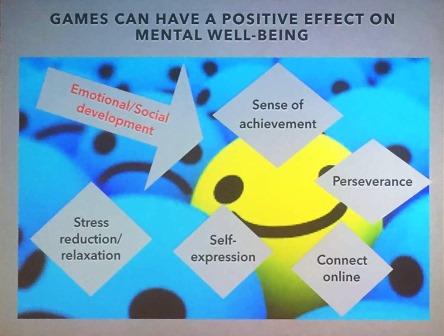
     •      what games teach our children and games’ positive effects
     •      effective processes to help set limits around games  

The topic is extremely relevant today, as our children do not grow up in the same world as we did! We now have to parent in a digital age, where we don't have the experience and know-how of growing up with digital devices and technology.

Pam Macmillan, currently Edtech coach at St Stithians Boys’ College and Greg Crighton, an educational psychologist with extensive experience in schools and private practice, gave some solid advice to parent with regards gaming and children. The "trick" is to be involved and to set up negotiated ground rules from a young age.

There are some negatives of gaming!


But the good far outweighs the bad!


Take control as a parent by sitting down with your child to discuss and negotiate time management. It boils down to having open conversations with your children. Take the time to "walk-through" the games (YouTube videos etc) and to play it with them. To use gaming as punishment (by taking it away), is not as effective as rather using it as a reward system: "The sooner your chores/homework are done, the sooner you can play and have a longer play time!"
It has been found that balanced children who play games, but also take part in other activities, such as sport and culture, are achieving better academically.


parenting
Pam Macmillan
Parenting controls with regards gaming:


- Put parental controls in place

- Encourage a balanced lifestyle

- Games should be a privilege, not a right

- Develop and maintain open communication

- Don't over react

- Encourage responsibility

- Choose the environment

- Educate yourself

- Play games with your child


The positives far outweighs the negatives with regards gaming and children. As in everything else in life, we need balance! We can provide the balance as parents!

Some final notes: Visual learning is effective! Gamification of learning is important in the future!  The brain selectively remembers, choosing the most stimulating moments of the day (memory and attention). To transfer the focal attention to the learning situation makes 100% sense. The learning outcomes are less important than the process. Pam Macmillan concluded to say that the benefits of learning with devices far outweighs the disadvantages!


*No, my child is not yet addicted to gaming, but I can start conversations with her about screen time, and balance in life! "Phew!"

Tuesday, 25 October 2016

Extramarks bagless learning in South Africa

Extramarks - - 360° solutions for comprehensive learning
I was invited to a breakfast by Extramarks at the Digital Education Show last week. They are starting to roll out "Bagless Learning" in South African schools. I was surprised at how well structured, hierarchical and easy-to-use the whole system looks.


It is no secret that I have a preferential tablet and operating system that I prefer! But Extramarks is definitely worth looking at as a holistic system to implement into a school, or use for homeschooling. Especially when the budget is low! They are not yet available on iOS, but apparently working towards it!

Extramarks started in South Africa about 18 months ago, mostly in private schools. They have 150 technology experts, and partnerships with Intel, Google and Telkom. The pedagogy is simplified into three steps: Learn > Practise > Test.

As soon as a learner walks into the school with the tablet, attendance is marked. All the learning is also available without connectivity! A great feature of the programme is a Career Assessment Programme. It is only available in English at the moment. There is also a preprimary-school programme available!

I am super impressed with the way they have implemented Extramarks into Dendron Secondary School, a rural school. I am trying to upload the video here.. (Come back later if it is not yet available. Sorry!)

Friday, 23 October 2015

Apple in Education Awards 2015 - mind-blown!


The yearly Apple in Education Awards was announced on Tuesday night!
As always I walked away with a an inspired feeling of FOMO! I am definitely missing out!
I wish I was in education right now!
I wish I was a student again!

The possibilities! The creativity!


This year there were again entries from Grade R to Grade 12.
70 schools from 9 provinces participated.
1156 projects were received which were judged by local and international judges.

Here is one of the winning entries:
Exploring the Sciences in Everyday Life - Thomas Granig from The Ridge School
"Gravity and beyond"


You can check out the rest of the winners here: Apple in Education competition 2015.

Christine Greig from Parklands College won in the iPhoneography part of the competition with her "Selfiest Self" portrait! Stunning!

Judge Bernard Viljoen (from "I was shot in Joburg") with Christine Greig

Lindsay Durell from Parklands College won the iTeacher award, and it was not difficult to guess, because she was on stage with many of her students!

Lindsay Durell

The following are links to the rest of the entries. If you have time, it is worth looking at all of these! And wondering How The *Genius they did it!

Expression Through The Arts: Gabriella Fedetto from St Stithian's College: Lovely

Bring to Life Your Favourite Historical/Literary Figure: Matthew Thompson from St Andrews: Winston Churchill

- Shape of my world: Luca Genovese from The Ridge School: The Shape of My World

iTunes U in the Classroom: Brett Udal from Hilton College


Well done to all the winners and the teachers who make this happen! You are stars!!


Which one of the projects are the most mind-blown to you?

Friday, 4 July 2014

iPad learning for special needs #iPadLearningZA


I learn something new each time I attend a workshop with regards the use of iPads and learning.

Karen Hart, an iPad Facilitator at Think Ahead, gave a workshop on Wednesday at the iStore on Sandton Drive about app solutions for special needs.

Karen Hart

iPad is the best for remedial teaching, because it has so many inbuilt features! 
(I believe it to be true, because I haven't seen other tablets with the same features!)

The Core Group is responsible for the following:
Local support for educators, parents and learners
Extensive teacher training
Curriculum integration
Infrastructure and technical planning and support
Parent and learner support (at every single iStore)
        Check out the iParent website for workshops and resources.
Community of best practise
International keynote speakers


App solutions for special needs:

Karen Hart:

Dysphasia

A child who can type, but not write.
He will type on the Notability app, and mail it back to the teacher. They could both scan their learning material, and mail it back to each other.
Apps: 

Dyslexia

Solutions:
- Improving character recognition  - Dyslexia Quest
- Zoom - a built-in function to enlarge text - 200 to 500%
- Speak selection - built-in function to read text aloud

Auditory learning

Struggling learning text documents

- Use in-built voice memo (or something like QuickVoice?) to record his summarized work 
- Memos can be shared via email or iTunes or on iOs devices (sent to iPod)
- The student listens to his summarized work
- App: Text Grabber to convert from image into text file
- In-built Speak Auto-Text (with Accessibility function) can be used here as well

Low Vision and Blind

In-built settings in Accessibility: (first place to change settings for visually or auditory challenged people)

- Inverted colours - black background with white text / with orange and purple
- Zoom function
- Voice-over > speaks every single version on screen
- Flexy: works with qwerty keyboard (chosen app) > builds up dictionary of your own words. Train it and create predictive text. Flexy speaks the iPad to you. 
- Google Maps - direct you step by step

Hard of hearing

This is especially a challenge in the South African context. (There are no sign language apps).

Apps:
Book Creato
- Can be used to create own manuals and videos for learning.
- Custom creation of visual dictionary
- The books are uploaded onto iBooks

iMovie (or can also use the normal video function on the iPad)
With iMovie there is an option to make your own movie or use the trailer function for                     instant themes.

In-built features:
Mono audio on iPad > can customize what level of sound go to ear
FaceTime > smooth communication
Camera for use in visual learning and teaching
- The Accessibility feature can be accessed by a triple click at the bottom.
Voice over - Change rate of speech that iPad speaks with Rotor function (twisting                               motion swipe up or down with three fingers
- Speak Selection (Choose voices)

We were shown how easy it is to use Book Creator and to incorporate video, picture and sounds. 
Book Creator has also come up again and again as one of THE apps to use with regards learning and teaching. Specific books can be created for specific needs, and children can use this very successfully in their own learning and projects at school. With one app you are able to create many different solutions!

I will do another post about Autism and some of the suggested apps by Elschen Kluge next week.


Related posts:


Tuesday, 3 June 2014

iPad in Education at Sacred Heart College #iPadLearningZA

Ipad being used at Sacred Heart College
(Photo: Core Group)
Sacred Heart College has implemented iPads 1:1 in their learning environment.


Colin Northmore, the Head of Sacred Heart College, says that for a device like this to have a transformative effect, it has to be everywhere and it has to be invisible.
"What you really want to do is to focus the children on the learning. They are getting better results because the children want to be engaged in learning!"

The success of the iPad project at Sacred Heart College is due to the following: 

  • The Emmaius Centre caters for students with special needs at Sacred Heart College. iPad is a critical tool for learning here and allows the school to meet the needs of individual students who may have specifi c barriers to learning. In these cases, iPad is used as a remediation and reinforcement tool.
  • The Knowledge Cafe is a session that runs once a week and allows teachers to share ideas, successes and their experience with using iPad in their lessons. This allows for knowledge to be shared across all areas of teaching and facilitates collaboration among teachers. 
  • The 3 to 6 Project is an after school initiative for underprivileged refugee students who do not attend school. The iPads are used regularly to aid in depth learning and understanding of basic numeracy and literacy concepts during this time.
  • Some students at Sacred Heart College have special requirements when it comes to writing exams. The iPad is regularly used as an audio tool so that students can listen to their exams. These students no longer need to have special venues arranged for them.
  • The registration of all extra mural activities in the primary school is done on the iPads and attendance is managed through an app by the teachers.
  • Sacred Heart College is the first school in South Africa to develop a course on iTunesU which is based on a successful project they ran with their grade 7’s. The course allows students to create their own interactive books utilising an app called “Composer” and teaches them to be creators of content, rather than just users. It has allowed them to develop critical skills such as time management, teamwork, creativity, music composition, marketing, problem solving and technical app development.
I love what the schools are accomplishing with these projects!


The link and information is supplied by the Core Group.

Thursday, 10 April 2014

Digital detox with Unroll.Me: great for busy moms

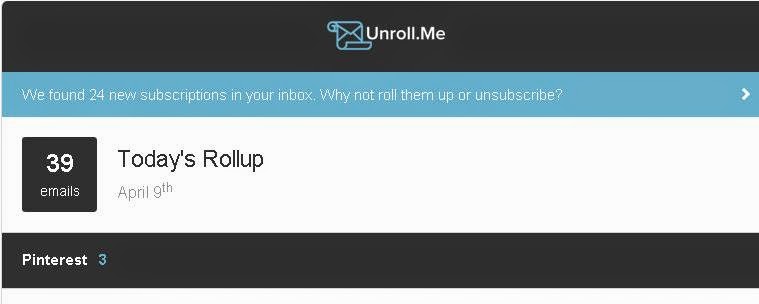
Daily Rollup in my Inbox

I was alerted to Unroll.Me in my Inbox.
It streamlines and cleans up your Inbox.

Lauren Browdy from Unroll.Me says the following about doing a "Digital detox:
 Sounds so nice, but it’s totally unpractical to go without technology for too long, right? Well, decluttering your inbox is the best way to bring about sanity, and save an extra hour in your day.
As a mom, having to clean up after your kids, and clean up your house, and NOW your inbox too – it’s totally unmanageable! While we can’t really help you with your house (sorry!), we can certainly do a thing or two about that inbox.
I want to introduce you to Unroll.Me – a free service that allows users to mass
unsubscribe from the subscriptions they no longer want to receive but keep the ones they want by placing them into a daily digest email, called the Rollup.
A study from the McKinsey Global Institute shows that we spend an average 13 hours of the workweek on email. Think about how much of that time can be saved by simply not having to sort through all the junk to find what you're looking for!"

I have been using it for a week, and I must confess that I love having a much cleaner Inbox.
I don't have to look at all the clutter that comes in regularly. You have an option to select a time during the day that you want the Daily Roll-up, and I love that it all gets sorted in different "boxes" when it comes from the same subscriptions.
I can decide to delete more subscriptions with the daily Rollup or I can unsubscribe some of the subscriptions that I want to see immediately when it comes in.

I can recommend it to any mom (for that matter; any person) who don't have the time wading through all those subscriptions each day.

I can't remember where I subscribed to most of it in the first place?
(Most probably those competitions that gets me to tick the subscribe boxes... "sigh")


Friday, 11 October 2013

Why iPads? #iSchoolAfrica


I got a first-hand experience of the implementation of iPads at Moshoeshoe Primary School in Daveyton. It is part of the iSchoolAfrica project with support from the Peermont School Support Programme

The question is of course why iPads are being used, and not other tablets as well?
Especially since it seems that the initial cost of the iPad is higher than that of other tablets.

- "The total cost of operation and ownership when compared to other devices are significantly lower once one looks beyond the cost of an individual item to the cost of the iSchoolAfrica mobile lab solution and the advanced educational ecosystem offered by Apple."
                                                      - Peermont School Support Programme

- The solution for unprivileged students are on par with the same comparable technological level that is required in the workplace, by implementing iPads.

- Apple offers a range of standard applications that support creativity in teaching and learning...
                                                       - Peermont School Support Programme

- Apple technology has fewer systems failures and fewer viruses, keeping downtime to a minimum. Fraser Speirs - who helped in implementing iPads 1:1, the first in the world - had the same experience.

- The IT support required is less than other solutions and less intimidating to ordinary educators. 
                                                        - iSchoolAfrica
   
- The applications are mapped to the South African curriculum.

- ZA Books covering over 1000 SA text book titles, are offered on the iPad.


I just love my own iPad 2, and how easy it is to operate! I was even able to upgrade to IOS 7 in recent days, and it has given me immense pleasure. I have an older version of the product, but I am still able to use all the most recent upgraded applications.
I am totally biased! I know!


Disclaimer: Nobody has given me an iPad or an iPhone (I wish ;-)) to say these on my blog.


Related posts:

- iPads at Moshoeshoe Primary School - changing the South African landscape #iSchoolAfrica 

- iPads in Education - I want to be a teacher now! #iPadSamG


Monday, 23 September 2013

Choosing iPads for your school - Fraser Speirs

Fraser Speirs with Michelle Lissoos

I am passionate about iPads in schools. Especially since I have seen what children are able to do with the iPad, and the yearly iPad in Education Awards which are totally awesome!

(I do not get an iPad for saying this!
I just love LOVE my own iPad2, wishing I have the most recent one! - Hint-hint, Universe!)

 I really hope my child's school will incorporate it in their learning programme. Apparently they have a three year plan in place! I have been one of the parents asking, again and again!

Fraser Speirs toured South Africa recently, made possible through the iStore. His claim to fame is that he is involved with the first school in the world that incorporated iPads 1:1 in their school. He has a background in software development and systems administration, and has been involved daily in the classroom.

I attended a session as part of a roadshow at Kingsmead School on 12 September, where Michelle Lissoos, Head of Think Ahead, introduced him. They provide the iPad solutions to schools, from pre-primary to higher education. They have flexible iPad solutions available, which addresses budget vs vision issues. A mobile lab is one way of introducing iPads to a school learning environment.

ZA Books is the text book store for iPad. It is not only about text books, but a sure way to start on the iPad route in a school.

Education app guides are available for primary and secondary education. Schools also starts with working with a core set of apps, which helps a lot with implementation.

They have made a 12 months interest free finance plan available to schools for buying iPads, and there are different purchase plans to match schools financials.

Fraser Speirs about their 1:1 implementation at Cedars School of Excellence in Greenock, Scotland:

 "Technology must always be subservient to goal of education to be effective!"

- Internet research is available in class to everybody.
- Everyone challenged on a level that suits them.
- 100% more engagement in the class.
- Some statistics:
       - 50,000,000,000 connected devices by 2025
       - 7 connected devices per person on planet
       - The world is already 1:1
- They spent 11 years to get their teachers to use technology.
- iPads with 10 hour battery, 9.7" screen, 1.5 pounds changed the scenery.
- They have found the "sweet spot" in usability, where they have adaptability to most tasks - Tasks of medium to moderate complexity.
- Bringing your own device is not a good idea, with the following issues:
       - big players are going vertical in mobile
       - "Equally bad everywhere" problem
       - "School uniform" problem - devices should be all the same.
- They are hiding the integration cost in cost of staff effort.
- The Web is Not Enough! any more.
- Technology is as accessible as paper.
- Different stages for different individuals / learners.
- Not an ICT project, but about improving education! They are even going into the gym.
- The teacher training programme starts with:

      "It's essential that the teachers live with the iPad" 

- The way of using it in the classroom: Research, synthesize and give back to teacher with the use of apps.
- They have a remedial for children coming from other schools in place.
- The stats show consistent better results!
"Students in iPad classes outperformed every other student!"
- They have put their curriculum on iTunesU. Found it to be very useful!
- During exams they deliberately use iPads less to put in exercises where students have to write for longer periods of times.
- They use Showbie for assessments which can be annotated by the teacher.
- Google Drive also very effective.
- Student teachers are not getting technology teaching > only 1 day in training > major issue ( in Scotland).
- 2% damage and failure over a year > 7 were damaged or failed. 0% stolen and 0% lost! (where Android devices have a 40% failure rate!)
- The right case to protect corners and closes cover of screen. (Important!)
- Ownership > school owns the entire set with a lease for 3 years. It stays with the kid, but if kid leaves, it stays behind.
- Everything begins with the leaders in the school! The head teacher and deputies should be there when introducing and starting an iPad programme.
- Some apps that are great to use: Showbie, Explain everything - whiteboard, Book creator, Adobe Reader, PDF creator
- How to get parents on board? Built cost of deployment in school fees. Parent information evenings, and explaining the educational validity. Today a whole lot more of information to convince parents. University if Holland did a very favourable research study.
- Wi-fi issues and density of use can crop up > performance issues > the solution is to have enough base stations.

It is very exciting times!

Thursday, 23 May 2013

iPads in Education - I want to be a teacher now!! #iPadSamG


Sam Gliksman
iPad in Education for Dummies

By now you know that I have an absolute passion for my iPad and for the use of the iPad in Education.

I am thinking of changing my career...
(Sometimes! No, lots of times! If only I were more adventurous!)
To be able to use this technology in teaching! It seems to me like it is the best time ever to be in teaching!

I had the extremely good fortune to be able to listen to Sam Gliksman talk about the use of iPad in Education. He is the author of iPad in Education for Dummies, and he is also an educational technology consultant for the last 20 years, an Aussie from America.

His website is here: Ipads in Education

The most important to remember is that Education is using iPads, and that the technology is not the goal! It stays education! It is about the development of a student-centered iPad learning environment.

Education of now has not stayed up to date. Children cites experiences of being bored and out-of-touch educational environments. Educational technology has not moved forward, but the business world and everything around us has moved on.
Children are disenfranchised and disengaged.

Children also learn very differently than we used to learn. Sam Gliksman showed us a video where we did not notice a man dressed in a guerilla suit because we were focusing on the white t-shirts handling the ball... (Okay, some did notice it, but I definitely did not the first time!)

Apparently the children see it, but they do not get the correct count as easily as the adults.

Children are multi-tasking, and absorbs images much more effectively. They are much better at adapting integrating media.
They need new skills and a new learning environment. That is where iPad fills the void.

"If we teach today as we taught yesterday,
we rob our children of tomorrow"
- Ancient Proverb

iPad has been in the game now for four years, to help achieve a successful learning environment.

The first 4 keys to a successful learning environment:

1. Solid Foundation
A reliable wireless network management structure which allows for yearly growth!

2. Sharing and communal learning
Apple TV is a wonderful application, but you are able to mirror the iPad through a laptop as well.

3. Communicate and prepare
Communicate your vision and direction to the teachers and the parents.

4. Share ... Carefully 
1 to 1 is preferably, but sharing devices are not insurmountable.

Sharing of content opens up a whole new learning environment on the iPad, where it is between students, teachers and students, and also with people outside the class.


The focus with the iPad should always be on the objective!
The teacher is not the expert, and it is not needed. 
He should only know what can be done, and give the students the freedom to do it! (Love this!!)

Encourage the unpredictable...

Investigate & analyse!

"The key to learning is to ask the right questions" - Einstein

We were shown a couple of examples of how students are incorporating the use of iPads in the classroom. Children building Mars rovers; Taking time lapse photography with the iPad of plants growing; Connecting with famous astronauts and authors through Twitter; A poetry jam with Garage Band; ... The possibilities are endless!

It is also possible to simulate frog dissections and star walks and to create ebooks and to investigate challenge based research...

Exciting!

The adoption rate for kids exhilarating! There are no impediments to children to use it!

-------------------


Michelle Lissos of Think Ahead Education Solutions  mentioned that there are now 200+ iPad schools in South Africa.

CAPS Workbooks are free on ZA Books.


The Apple in Education Competition was launched already for 2013 where creativity in the classroom
are rewarded.

There is an upcoming iPad journey workshop on 5-7 June where teachers and principals can get a hands-on workshop experience who are new to iPad.

There is also a special for teachers to buy an iPad and pay over 12 months, interest free!

---------------------

In the meantime I have talked to both our Pre-Primary School Head, and our future Primary School Head, and they are both very eager and open-minded towards the use of this technology!
Think Ahead did contact them about getting it started!
I am keeping my thumbs crossed!


Do your schools have implemented it already, and what are your experiences?


Related posts:

- Afrikaans op die iPad

- Even I can make sushi with an iPad

- Apple in Education 

- Excited about ZA Books


Thursday, 7 March 2013

Afrikaans op die iPad


Everyone who knows me, or have read some here, knows that I am extremely excited about the use of tablets at school.
iPads for children are really the next big step to revolutionize the education systems, worldwide, but specifically here!

Yes, for us here in South Africa it is still a new thing.
My Little Missy's schools does not have the technology incorporated at the moment! But there are some positive moves in the right direction...

I am excited about ZA Books, the eTextbook solution for South African schools that was launched a couple of weeks ago. There is an app available for the South African curriculum on your iPad.

I got excited last year when Apple in Education had their awards evening, and I learnt that 72 schools have already taken part in the competition, and to see how creative the children are with the technology!

One of the things that gets asked most is about the language barriers for children. I have found that the children does not see it as a barrier at all, and that our Afrikaans speaking children do not have a problem with it.

I attended Afrikaans the iPad way session at the iStore on Monday.
Liande Engelbrecht is the Afrikaans teacher at Redhill School who uses the iPad to make Afrikaans alive to the children.

Linade Engelbrech to the left, and Lulu Burger (Think Ahead)

I was amazed to hear that she does not suggest the apps to use, but mostly gives an assignment, and the children comes up with their own solutions on the iPad.

The apps that they are using in the Afrikaans class are as follows:

- Spelling Free
- 50 Languages: Afrikaans/...
- YouTube
- Google
- Paint
- Garage Band
- Spin Art Studio
- Comic Lite / Zoodle Comics
- Poplets
- Keynote
- Infinite canvas
- Maramedia e-boek
- Notes Plus
- Educreation
- Vegas
- 100 floors
- 4 pics 1 word

You will notice that most of the apps are not in Afrikaans, but are used for Afrikaans language teaching.
A student demonstrating Keynote
The children demonstrated how they used the apps, and showed us some of their work.
Very inspiring.
I have since downloaded some of the apps myself to test it out. ;-) (Feeling like a tech geriatric!)

One other interesting fact is the way how the children handle these devices.
Because it is so very expensive, and because it is expensive to repair, they take care of it!
Their school has built in a system of training of how to handle the devices, and they have lockers for it!

Another interesting development is that iPad Genius Clubs are being launched at schools. The children manage the iPad labs, and the training is for free.


I love the technology that's available now to our children!


Related posts:

Excited about ZA Books

Apple in Education 

iPads for children #iStoreMomsandKids

Thursday, 15 November 2012

KidChart - disciplining app number 2 under investigation

KidChart

I downloaded KidChart, the second of 10 iPhone apps that help with discipline.
I have to download the apps on my iPad, since I don't have an iPhone, but it seems to work just as well!

- KidChart is a very simple and easy app to use on the go!

- As a parent who like a more positive parenting approach, I would only try to focus on the smiley face, but the user could use it both ways.

- I like the fact that you can add behaviours as you go along.


- The app generated a very nice certificate which I like, attached with the specifics in a next view.


- You are able to share the accomplishments via email or Facebook.

- What I don't like is that you only get the wording when you share. Not the attached certificate. It would have given it an extra edge. It would also ensure that other people know where it is coming from. Now you only get an update with no explanation.


- You are also able to link it to DropBox, which helps to keep the accomplishments safe.

- It stores the "certificates" and "warnings" by date so that it is possible to reflect on it later. That gets a thumbs up from me!

I don't think I will use this app that much, but I will let you know in future when I change my mind.

I have send feedback to the developers about including the certificate with more information.

I give this app a rating of 5/10


Related posts:

- 10 iPhone apps that help with discipline

- Caught being Good - List


Friday, 9 October 2009

Virtual kids


The technology has its advantages when you are trying to sleep. At half past 4 this morning, Mieka was sitting next to us in bed, bobbing on a video playing from my cell phone. It struck me that my daughter of 9 and half months is growing up in the virtual world. I am writing about her in the virtual world of the Internet. She is represented in the digital domain in a blog. My eldest daughter of 16 years has made her own digital footprint already, she uses MXit and Facebook. When Arnia was born, I did not have a cell phone or a computer. Since then, our lives have changed considerably with regards to technology. How are things going to change in the next 16 years? It feels like there is a quickening with regards to time, but also to the exponential quickening of the use of technology. Are we all going to tweet on each other’s tweets, playing mafia wars and building farms in a virtual reality? How are we going to talk to each other in a few year’s time? I find it very exciting.

Subscribe via email

Blog Archive

Mommalicious

Blogarama

Blogarama - Friends & Family Blogs