Showing posts with label istore. Show all posts

Thursday, 8 October 2015

The best mobile photography! #iPhoneography2015


The fifth iPhoneography Awards evening in Johannesburg was held last night at the iStore on Sandton Drive. This was my first time that I attended, with the family in tow. We all enjoyed it!
I will definitely bookmark this for the future!

It is worth seeing what people can do with an iPhone with regards photography. All the entries were taken and edited on iPhones! It is truly inspiring!

Africa is Absolute category


The food trucks had great food and smells

The lawns provide a great spot for catching up and enjoying the vibe!

Little Miss had a ball climbing the "hills" and running around

Inspiring entries!
The overall winning entry is by Jaco van der Walt with his "Emergence" photograph!
Stunning!


Maybe next year your entry will be here as well?
And mine! ;-)

Friday, 4 July 2014

iPad learning for special needs #iPadLearningZA


I learn something new each time I attend a workshop with regards the use of iPads and learning.

Karen Hart, an iPad Facilitator at Think Ahead, gave a workshop on Wednesday at the iStore on Sandton Drive about app solutions for special needs.

Karen Hart

iPad is the best for remedial teaching, because it has so many inbuilt features! 
(I believe it to be true, because I haven't seen other tablets with the same features!)

The Core Group is responsible for the following:
Local support for educators, parents and learners
Extensive teacher training
Curriculum integration
Infrastructure and technical planning and support
Parent and learner support (at every single iStore)
        Check out the iParent website for workshops and resources.
Community of best practise
International keynote speakers


App solutions for special needs:

Karen Hart:

Dysphasia

A child who can type, but not write.
He will type on the Notability app, and mail it back to the teacher. They could both scan their learning material, and mail it back to each other.
Apps: 

Dyslexia

Solutions:
- Improving character recognition  - Dyslexia Quest
- Zoom - a built-in function to enlarge text - 200 to 500%
- Speak selection - built-in function to read text aloud

Auditory learning

Struggling learning text documents

- Use in-built voice memo (or something like QuickVoice?) to record his summarized work 
- Memos can be shared via email or iTunes or on iOs devices (sent to iPod)
- The student listens to his summarized work
- App: Text Grabber to convert from image into text file
- In-built Speak Auto-Text (with Accessibility function) can be used here as well

Low Vision and Blind

In-built settings in Accessibility: (first place to change settings for visually or auditory challenged people)

- Inverted colours - black background with white text / with orange and purple
- Zoom function
- Voice-over > speaks every single version on screen
- Flexy: works with qwerty keyboard (chosen app) > builds up dictionary of your own words. Train it and create predictive text. Flexy speaks the iPad to you. 
- Google Maps - direct you step by step

Hard of hearing

This is especially a challenge in the South African context. (There are no sign language apps).

Apps:
Book Creato
- Can be used to create own manuals and videos for learning.
- Custom creation of visual dictionary
- The books are uploaded onto iBooks

iMovie (or can also use the normal video function on the iPad)
With iMovie there is an option to make your own movie or use the trailer function for                     instant themes.

In-built features:
Mono audio on iPad > can customize what level of sound go to ear
FaceTime > smooth communication
Camera for use in visual learning and teaching
- The Accessibility feature can be accessed by a triple click at the bottom.
Voice over - Change rate of speech that iPad speaks with Rotor function (twisting                               motion swipe up or down with three fingers
- Speak Selection (Choose voices)

We were shown how easy it is to use Book Creator and to incorporate video, picture and sounds. 
Book Creator has also come up again and again as one of THE apps to use with regards learning and teaching. Specific books can be created for specific needs, and children can use this very successfully in their own learning and projects at school. With one app you are able to create many different solutions!

I will do another post about Autism and some of the suggested apps by Elschen Kluge next week.


Related posts:


Friday, 13 June 2014

What I would like to buy for Father's Day at the iStore #lovefromistoresa


I wish I could just walk into the any iStore and buy for all the fathers in my life some of these wonderful gifts.

I have a great father and father-in-law, and Hubby is the best father to our children.
I do not think we say thank you enough for what they have done for us and our children.


The gifting guide doesn't make it easy, but here goes my list: 

(For future reference: This can be a gifting guide for myself as well! (Not so subtle hint!))


1. A new iPad (more than the 16GB he has)

2. Any of the Knomo briefcases that they have in store.

3. The Fitbit Flex to keep track of his exercise routine.

4. An iHealth Blood pressure monitor.

5. The Apple TV.

6. A Tech 21 Protective Case.

7. An iTunes gift card.

8. An iStore Gift Card.

9. The Marshall Stanmore stereo speaker.

10. A MacBook Air.


Rattle and Mum compiled the complete list of Father's Day gifts that are available at the iStore. Head over there if you are still stumped for a Father's Day gift!


Disclaimer: I received two of these products from the iStore for Father's Day. 
Hubby will only know which two on Sunday. Thanks, iStore!


Thursday, 19 December 2013

Last minute gift ideas for Christmas

Little Missy has given us her list of stuff she wants for her birthday and for Christmas. 
We just need some time to go and buy it...
This year it is going to be less expensive gifts than the previous year. One present for a birthday, and one present for Christmas are more than enough. 

This year it is about the family time spent together, which we are seriously looking forward to. 

The iStore has a great gifting section for last minute Christmas ideas. It is worth checking there for great gifts for children AND adults.

Little Missy got these three cute gifts which are great gadgets to have.

Griffin KaZoo AUX Cable for Kids (and adults, because we are using it as well)
Connect most audio devices with a 3.5mm stereo jack with this Griffin Technology KaZoo auxiliary cable that features a caterpillar/butterfly design to add a touch of fun. 


Griffin Crayola MyPhones

I especially love these, because they have a built-in volume limiter, which makes me feel safe to leave the Little One in peace playing with her games on the gadgets. We are always arguing about the noise level, but when she has the ear phones on we don't have to worry that it will is too loud for her ears.

They came with stickers and markers, and Little Missy really enjoyed brightening them even more!


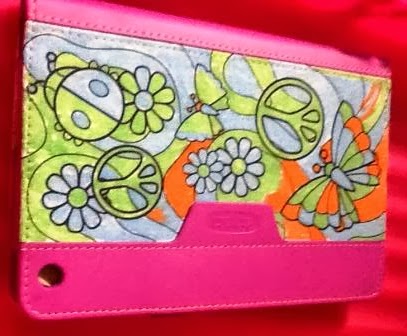
Griffin Crayola Color-A-Folio for iPad mini 

Crayola's Color-A-Folio lets you customise your iPad mini case with fabric markers.
We would have liked a greater selection of colours, but the colour combination works extremely well.

Now I just need to go and buy that iPad mini! (Thanks for the nudge, iStore!)


Disclaimer: We received these three gifts in this cute little suitcase, which is very Cool indeed!


Monday, 23 September 2013

Choosing iPads for your school - Fraser Speirs

Fraser Speirs with Michelle Lissoos

I am passionate about iPads in schools. Especially since I have seen what children are able to do with the iPad, and the yearly iPad in Education Awards which are totally awesome!

(I do not get an iPad for saying this!
I just love LOVE my own iPad2, wishing I have the most recent one! - Hint-hint, Universe!)

 I really hope my child's school will incorporate it in their learning programme. Apparently they have a three year plan in place! I have been one of the parents asking, again and again!

Fraser Speirs toured South Africa recently, made possible through the iStore. His claim to fame is that he is involved with the first school in the world that incorporated iPads 1:1 in their school. He has a background in software development and systems administration, and has been involved daily in the classroom.

I attended a session as part of a roadshow at Kingsmead School on 12 September, where Michelle Lissoos, Head of Think Ahead, introduced him. They provide the iPad solutions to schools, from pre-primary to higher education. They have flexible iPad solutions available, which addresses budget vs vision issues. A mobile lab is one way of introducing iPads to a school learning environment.

ZA Books is the text book store for iPad. It is not only about text books, but a sure way to start on the iPad route in a school.

Education app guides are available for primary and secondary education. Schools also starts with working with a core set of apps, which helps a lot with implementation.

They have made a 12 months interest free finance plan available to schools for buying iPads, and there are different purchase plans to match schools financials.

Fraser Speirs about their 1:1 implementation at Cedars School of Excellence in Greenock, Scotland:

 "Technology must always be subservient to goal of education to be effective!"

- Internet research is available in class to everybody.
- Everyone challenged on a level that suits them.
- 100% more engagement in the class.
- Some statistics:
       - 50,000,000,000 connected devices by 2025
       - 7 connected devices per person on planet
       - The world is already 1:1
- They spent 11 years to get their teachers to use technology.
- iPads with 10 hour battery, 9.7" screen, 1.5 pounds changed the scenery.
- They have found the "sweet spot" in usability, where they have adaptability to most tasks - Tasks of medium to moderate complexity.
- Bringing your own device is not a good idea, with the following issues:
       - big players are going vertical in mobile
       - "Equally bad everywhere" problem
       - "School uniform" problem - devices should be all the same.
- They are hiding the integration cost in cost of staff effort.
- The Web is Not Enough! any more.
- Technology is as accessible as paper.
- Different stages for different individuals / learners.
- Not an ICT project, but about improving education! They are even going into the gym.
- The teacher training programme starts with:

      "It's essential that the teachers live with the iPad" 

- The way of using it in the classroom: Research, synthesize and give back to teacher with the use of apps.
- They have a remedial for children coming from other schools in place.
- The stats show consistent better results!
"Students in iPad classes outperformed every other student!"
- They have put their curriculum on iTunesU. Found it to be very useful!
- During exams they deliberately use iPads less to put in exercises where students have to write for longer periods of times.
- They use Showbie for assessments which can be annotated by the teacher.
- Google Drive also very effective.
- Student teachers are not getting technology teaching > only 1 day in training > major issue ( in Scotland).
- 2% damage and failure over a year > 7 were damaged or failed. 0% stolen and 0% lost! (where Android devices have a 40% failure rate!)
- The right case to protect corners and closes cover of screen. (Important!)
- Ownership > school owns the entire set with a lease for 3 years. It stays with the kid, but if kid leaves, it stays behind.
- Everything begins with the leaders in the school! The head teacher and deputies should be there when introducing and starting an iPad programme.
- Some apps that are great to use: Showbie, Explain everything - whiteboard, Book creator, Adobe Reader, PDF creator
- How to get parents on board? Built cost of deployment in school fees. Parent information evenings, and explaining the educational validity. Today a whole lot more of information to convince parents. University if Holland did a very favourable research study.
- Wi-fi issues and density of use can crop up > performance issues > the solution is to have enough base stations.

It is very exciting times!

Thursday, 5 September 2013

Having fun with an iPhone and a MINI Paceman in Johannesburg #iPhoneographySA #iStoreSA

I had so much fun today. I got to take photos with an iPhone for an iPhoneography photo walk in Johannesburg, as well as being driven around in a Mini Cooper S Paceman.

The iPhone was on loan, and I am totally i-jealous after I saw how easy it was to take very nice photos with it.

The igers and iphoneographers have been doing it for about three years, and the big hype is taking part in the competition which launched today - the excitement of the yearly iPhoneography exhibition. Anybody with an iPhone can submit their photos to be entered in the competition.

Here are some of my photos taken on the iPhone. 

We went to Zoo Lake and the Military Museum in Johannesburg. 

With the two Techie Geeks that had a lot of tips up their sleeves:
 Jessica Meyer and Gina Jacobson
Searching for the perfect shot

Zoo Lake cat

Praying

The Mini was tested with a big wooden elephant bought by Gina
(It passed the test!)
The Military Museum

Sandton rising!
Apparently there are more photos being taken and uploaded on an iPhone than any other phone.
I can see why!


This is what I want for Christmas! An iPhone!
And a Mini Cooper S Paceman won't be bad as well!


Thursday, 23 May 2013

iPads in Education - I want to be a teacher now!! #iPadSamG


Sam Gliksman
iPad in Education for Dummies

By now you know that I have an absolute passion for my iPad and for the use of the iPad in Education.

I am thinking of changing my career...
(Sometimes! No, lots of times! If only I were more adventurous!)
To be able to use this technology in teaching! It seems to me like it is the best time ever to be in teaching!

I had the extremely good fortune to be able to listen to Sam Gliksman talk about the use of iPad in Education. He is the author of iPad in Education for Dummies, and he is also an educational technology consultant for the last 20 years, an Aussie from America.

His website is here: Ipads in Education

The most important to remember is that Education is using iPads, and that the technology is not the goal! It stays education! It is about the development of a student-centered iPad learning environment.

Education of now has not stayed up to date. Children cites experiences of being bored and out-of-touch educational environments. Educational technology has not moved forward, but the business world and everything around us has moved on.
Children are disenfranchised and disengaged.

Children also learn very differently than we used to learn. Sam Gliksman showed us a video where we did not notice a man dressed in a guerilla suit because we were focusing on the white t-shirts handling the ball... (Okay, some did notice it, but I definitely did not the first time!)

Apparently the children see it, but they do not get the correct count as easily as the adults.

Children are multi-tasking, and absorbs images much more effectively. They are much better at adapting integrating media.
They need new skills and a new learning environment. That is where iPad fills the void.

"If we teach today as we taught yesterday,
we rob our children of tomorrow"
- Ancient Proverb

iPad has been in the game now for four years, to help achieve a successful learning environment.

The first 4 keys to a successful learning environment:

1. Solid Foundation
A reliable wireless network management structure which allows for yearly growth!

2. Sharing and communal learning
Apple TV is a wonderful application, but you are able to mirror the iPad through a laptop as well.

3. Communicate and prepare
Communicate your vision and direction to the teachers and the parents.

4. Share ... Carefully 
1 to 1 is preferably, but sharing devices are not insurmountable.

Sharing of content opens up a whole new learning environment on the iPad, where it is between students, teachers and students, and also with people outside the class.


The focus with the iPad should always be on the objective!
The teacher is not the expert, and it is not needed. 
He should only know what can be done, and give the students the freedom to do it! (Love this!!)

Encourage the unpredictable...

Investigate & analyse!

"The key to learning is to ask the right questions" - Einstein

We were shown a couple of examples of how students are incorporating the use of iPads in the classroom. Children building Mars rovers; Taking time lapse photography with the iPad of plants growing; Connecting with famous astronauts and authors through Twitter; A poetry jam with Garage Band; ... The possibilities are endless!

It is also possible to simulate frog dissections and star walks and to create ebooks and to investigate challenge based research...

Exciting!

The adoption rate for kids exhilarating! There are no impediments to children to use it!

-------------------


Michelle Lissos of Think Ahead Education Solutions  mentioned that there are now 200+ iPad schools in South Africa.

CAPS Workbooks are free on ZA Books.


The Apple in Education Competition was launched already for 2013 where creativity in the classroom
are rewarded.

There is an upcoming iPad journey workshop on 5-7 June where teachers and principals can get a hands-on workshop experience who are new to iPad.

There is also a special for teachers to buy an iPad and pay over 12 months, interest free!

---------------------

In the meantime I have talked to both our Pre-Primary School Head, and our future Primary School Head, and they are both very eager and open-minded towards the use of this technology!
Think Ahead did contact them about getting it started!
I am keeping my thumbs crossed!


Do your schools have implemented it already, and what are your experiences?


Related posts:

- Afrikaans op die iPad

- Even I can make sushi with an iPad

- Apple in Education 

- Excited about ZA Books


Friday, 15 March 2013

Even I can make sushi with an iPad #iStoreSA


The only relationship I want with food, is by eating it. That I love!

I hate am not fond of making food, unless on very special occasions. 
I did not enjoy previous team building sessions by my Hubby's work team where we were invited to prepare our own food at the End-of-Year function

But I was intrigued when I was invited to become a sushi expert with iStore and iPad. 
Because sushi is a favourite food, and because I love finding new applications with my iPad. Up until now I haven't look that much at the recipes and food applications on my iPad.

Master Chef  Mija Moto (sorry, not sure about the spelling) demonstrated the sushi app Teach me Sushi, which has step by step photo instructions, with a video demonstration added to that! 


We worked in pairs, and I was the "brain" who had to go and look at the hands-on demo of traditional Japanese sushi by the Master Chef, while my partner had to follow the same instructions on the iPad. 
She was also the one who put together our first sushi platter. (With my expert help, of course!)

Chef Karin at work!
It looks much easier than it is! The rice does not stay where it is supposed to, and the filling popped out of the sides, but we got some right! With only an hour and a half of instructions, and trying it ourselves, I don't think it looks too bad. It also tasted GOOD!


I think it is possible to become a Master Chef with an iPad!
(If you wanted to!)


The iStore supplied a whole list of recommended iPad apps in the kitchen:

- Epicurious (free)
- Allrecipes - Your Kitchen Inspiration (free)
- How to Cook Everything
- Vegetarian How to Cook Everything
- The Photo Cookbook
- Table for Two
- Jamie Oliver (free)
- Green Kitchen
- Teach me Sushi
- Grill It!
- Martha Stewart makes Cookies
- Divine Chocolate HD (free)
- Hello Cupcake (free)

Thank you, it was a great afternoon!


Related posts:


Thursday, 7 February 2013

Excited about ZA Books

ZA Books
ZA Books launched yesterday.
It is the eTextbook solution for South African education!

South African school pupils are able to download all their textbooks on an iPad, with much less cost to them, and a lot of flexibility with regards manipulation of taking notes, highlighting and search within a textbook.

It is possible to put this into each child's hand, even in rural South Africa where there already are solutions to power these devices by solar.

Taryn Hyam at iStore, Sandton


Taryn Hyam announced the launch of the ZA Books website, as well as how much inroads Apple has made already with regards education in South Africa. 
80 000 educational apps are available through the iTunes store. App guides were release last year to help parents and students with choosing the right apps. It is divided into the various grades, for primary and secondary school. 

180 schools in South Africa have already implemented iPads, of which 120 are private and government schools. 60 of these schools are iSchoolAfrica sponsored. There are a variety options available of how to implement the iPads: 1 to 1 programmes or mobile labs.

A nice video presentation of the schools that are already using iPads are available on the ZA Books home page: 


I love how teachers are responding: The children "brighten up!" (Ndlelenhle Primary School) or that "Nobody wants to miss an iPad class." It is "engaged learning!"

The observations that are forthcoming from the use of iPads: engagement, motivation, discipline, differentiation, reward and re-mediation are significantly higher!

It "allows the teachers to feel like rock stars!"

The global trends are the same, where the digital solution has become a simple choice!

The results are:
Increased interest in reading;
Cost saving;
Homework completion up;
Accessibly for special needs;
Personalised learning;
No more heavy backpacks!

Linda de Klerk
ZA Books
Linda de Klerk gave more clarification on ZA Books and how it is being implemented. 

ZA Books includes CAPS aligned titles, as well as normal reading titles. Teacher's manuals, handbooks and workbooks are available. 
It is already available in 6 languages, and 33 subjects are launched, with 600 titles available. More are being made available on a daily basis!
I checked: There are quite a number of Afrikaans books available already!

Schools can start registering at ZA Books to get a volume licence, and purchasing are done on the website. Individuals can also register.

The ZA Books app is available to download for free.

There is going to be two phases of implementation: Phase 1: school licensing; and Phase 2: individual purchasing.

The pricing is a minimum of 25% cheaper than the physical printed title!

ISchoolAfrica addresses schools in more rural environments by way of corporate sponsorships.
There are tailored solutions for each school.

I also enquired about how I can get my child's schools to adopt this type of learning. 
I was introduced  to Michelle Lissoos of Think Ahead Education Solutions. They help with talking to the principals, the selection of the right solutions for the school, the training of the teachers and implementation.

They have implemented these programmes into Afrikaans schools as well!


I am so excited about this! I will be the parent this year who will go and pester talk to the principals of my child's pre-primary and primary schools. If not this year, then the following year!

I will keep you updated, and on how easy this process is!

Do your children use iPads at school, and what are your thoughts about it?


Related posts:


Sunday, 30 September 2012

Archiving all the art


A toddler is a daily creative machine of art!

I found a great app to store all the art that's constantly being created!

I really want to keep everything, but it becomes just too much.

It is a good idea to photograph it, but with my artkive I am also able to title and date the photographs and share it from there with friends and family.

And it is stored in an archive of art!
I "Like it!

I do not get paid to say this!

The best: the app is free!
ArtKive

Subscribe via email

Blog Archive

Mommalicious

Blogarama

Blogarama - Friends & Family Blogs